ClassDojo
- 4.8
- Rating
- 50.00M
- Installs
- Free
- Price

 Analysis by App-foxy
I came away from ClassDojo thinking of it less as a traditional learning app and more as a shared communication space for a classroom community. It is an Education app developed by ClassDojo, and its central purpose is to keep teachers, children, and families connected in one place. That sounds simple, but the practical value depends heavily on how consistently a school uses it and how comfortable each family is with another stream of messages, updates, and classroom activity.
In my experience, the app makes the most sense when a teacher wants a lightweight way to keep families involved without relying entirely on paper notices, scattered messages, or separate tools for every classroom update. I would recommend trying it if your child’s school already uses it actively. I would be more cautious about installing it merely because it is popular, since its usefulness is closely tied to the quality and frequency of communication coming from the classroom.
How ClassDojo feels in everyday classroom communication
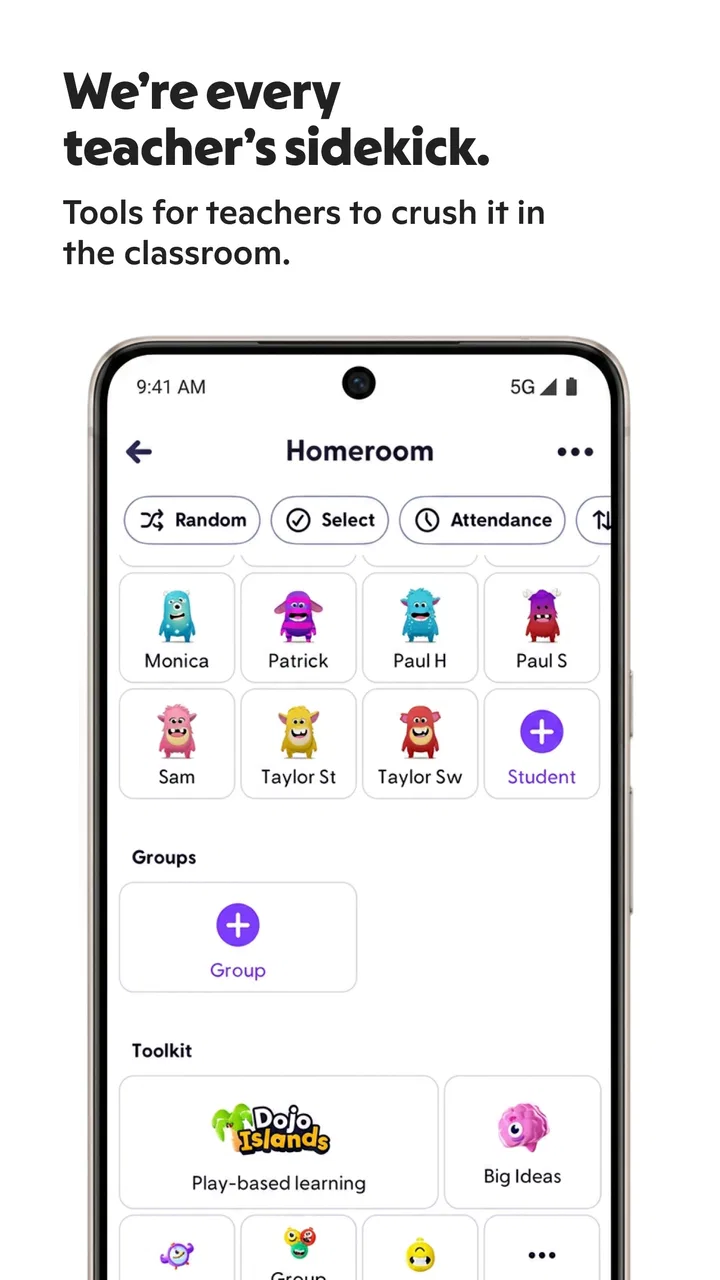
The first thing I noticed is that the app is designed around several kinds of users rather than a single learner sitting alone with a lesson. Teachers use it to communicate, children can take part in the classroom experience, and families can follow what is happening. That shared structure is its defining strength, but it also means the app is not a replacement for a full learning-management system, a video classroom, or a dedicated homework platform.
You May Also Like

 Pandora - Music & Podcasts
Pandora’s Music Is Easy to Start, but Harder to Recover
Pandora’s strength is its low-effort path from a seed to a station. Its weak spot is how much confidence it asks you to place in connection, setup, and quiet recovery.

 8 Ball Pool
 Is Built on Rivalries, Rematches, and Routine
A close look at the rivalries, rematches, shared routines, and unanswered safety questions that turn a quick pool match into a persistent mobile community.

 Samsung Music
’s Quiet Strength Is Playing What You Already Own
Its reach comes less from spectacle than from dependable access to a personal library. That simplicity is both the app’s strongest retention engine and its ceiling.

 AccuWeather: Weather Radar
AccuWeather Review: A Quick, Clear Forecast for Everyday Decisions
For everyday plans, the best forecast is the one you can understand quickly. AccuWeather makes rain timing, radar, and local conditions easy to act on, with a few trade-offs.

 Hill Climb Racing
Why Hill Climb Racing Still Turns Crashes Into One More Run
A tiny car, a bumpy hill and one more upgrade: Hill Climb Racing keeps resurfacing because its simple chaos makes every near-miss feel personal.

 AliExpress - Shopping App
AliExpress Makes Global Shopping Feel Personal, but Shoppers Bear the Risk
AliExpress turns a global marketplace into a pocket-sized discovery engine. Its reach is useful, its shopping loop compelling, and its trade-offs easy to miss.
More From Our News Desk
View All News


For a parent, the useful question is not simply whether the app has many tools. It is whether it reduces the effort needed to stay informed. When a school uses it well, I can see the appeal: classroom communication is gathered into a familiar mobile space, and a family member can check in without searching through several unrelated services. The benefit is especially clear for households where more than one adult needs visibility into school life.
The app is free to install, with optional in-app purchases ranging from $0.99 to $199.99 per item. That makes the starting point approachable, although I would still pay attention to which parts a school actually expects families to use and which options are extras. A free download does not automatically mean every available function is equally relevant to your child’s classroom.
What makes the workflow different from ordinary school messages
Compared with a basic email thread, ClassDojo feels more centered on the child and the classroom community. Email is excellent for formal notices and documents, but it can become difficult to follow when announcements, replies, attachments, and unrelated school conversations mix together. This app is better suited to frequent, classroom-focused contact where the goal is to keep the connection visible rather than bury it in an inbox.
Compared with a school portal, it can feel less administrative. A portal often puts grades, attendance, schedules, and official records first. ClassDojo is more about the day-to-day relationship between home and classroom. That distinction matters: I would not choose it as the only place to look for every piece of academic information unless the school has clearly organized its process around it.
One practical tip is to decide in advance who in the family will monitor it and when. Checking repeatedly throughout the day can turn a helpful communication tool into a source of distraction. A short routine after school or in the evening is usually more sensible than treating every notification as urgent.
Where it helps families most
The strongest use case is a family that wants a clearer window into classroom life but does not need a complicated academic dashboard. It can also suit teachers who want to make communication more approachable for parents who are not comfortable with formal school software. The child-focused design gives conversations a more personal feel than a standard announcement system.
It is also useful when a parent cannot attend every school event or speak with the teacher at pickup time. A mobile connection cannot replace a proper conversation about a serious concern, but it can make ordinary updates easier to notice. That is a meaningful difference for families managing work schedules, multiple children, or changing daily routines.
For children, the value depends on age and classroom practice. The content rating is Everyone, which makes the app suitable for a broad audience, but an age-friendly rating does not tell me how engaging or appropriate every classroom interaction will feel for every child. Younger users may need an adult to guide them, while older children may appreciate having a more visible role in their classroom community.
Speed, stability, and what happens during busy moments
I look at busy moments as a test of more than loading speed: they reveal whether a family can keep school communication clear without feeling obliged to watch the app constantly. I’d decide ahead of time which updates need action and save longer conversations for a quieter moment. That practical routine also makes it easier to judge whether the app’s controls and choices fit your family.
What to expect from everyday speed
I would set reasonable expectations rather than expect the instant responsiveness of a simple notes app. ClassDojo brings together communication between several groups, so the experience can feel busier than a single-purpose tool. In ordinary use, the important question is whether opening the app, checking an update, and returning later feels straightforward enough to become a habit.
The current version is 8.23.0, and it supports devices running Android 8.0 or later. Those details suggest that compatibility is not aimed at the very oldest Android hardware. If your phone is relatively recent and has enough free space for normal app operation, I would expect the basic experience to be more comfortable than on an aging device that already struggles with many apps.
My practical advice is to avoid judging the app only during the first few minutes after installation. Communication tools become more demanding when there is a backlog of updates, several conversations to review, or classroom media to load. A clean first launch may not represent the busiest moment of the school week.
Heavy-use moments are more revealing
The most demanding situations are likely to occur when many families check classroom updates around the same time, when a teacher posts a large batch of material, or when you return after several days away and need to catch up. These are the moments when an app’s organization matters as much as raw speed. Even a fast interface becomes frustrating if important messages are hard to distinguish from routine activity.
I found that the best way to keep the experience manageable is to treat the app as a stream that needs occasional housekeeping. Read the items that affect your child first, deal with anything requiring a reply, and avoid trying to process every update as though it carries the same urgency. This is a small habit, but it prevents the app from becoming an endless scrolling task.
Another useful trade-off is deciding whether classroom participation should happen from a phone or a larger screen. A phone is convenient for quick checks and short replies. A tablet or computer can be more comfortable when a teacher shares more substantial material or when a parent needs to review several updates carefully. The app’s value is not limited to one device, but the right screen can make busy periods less tiring.
Reliability is also about communication discipline
When people describe a school communication app as reliable, they often mean two different things. They may mean that the software opens and displays information consistently, or they may mean that they can trust it as the official route for important messages. Those are not identical. Even if the app works smoothly, a family can still miss something if notifications are ignored, accounts are not checked, or the school uses several channels at once.
I would therefore establish a clear rule with the teacher or school: which announcements belong in ClassDojo, which matters require a direct conversation, and where formal records are kept. That simple agreement prevents the app from being treated as an emergency line when it was intended for ordinary classroom communication.
Recovery after a missed period is another important consideration. If you do not open the app for several days, the challenge is not merely loading it again; it is identifying what deserves attention first. I recommend reviewing from the oldest unread classroom item forward, then checking for anything that asks for a response. This approach is more reliable than scrolling randomly through a busy feed.
Device limits and resource expectations
Because the minimum Android requirement is 8.0, owners of older phones should check compatibility before planning around the app. A device that technically meets the operating-system requirement may still feel uncomfortable if it has limited storage, weak battery health, or many background apps competing for resources. I would not call ClassDojo a sensible reason to replace a phone, but I would avoid using a nearly full or poorly maintained device for school communication.
Resource demands can also be felt indirectly. Frequent alerts may encourage repeated checking, and repeated checking can affect battery habits more than a single short session. If the app becomes noisy, the solution is not necessarily to uninstall it; it may be better to review the phone’s notification choices and agree on a checking schedule with the family. The aim is dependable awareness, not constant interruption.
Families sharing one older device should think about access as well. A parent may need the app during the same period a child wants to view classroom content, and switching between users or devices can add friction. In that situation, a browser-based school portal or email may be easier for some tasks, while ClassDojo remains useful for quick mobile updates.
Who should choose another option
I would skip ClassDojo as a primary tool if you need detailed grade calculations, structured course modules, advanced assignment management, or a complete record of academic progress. A dedicated learning platform is usually better for those needs. I would also hesitate if your school rarely posts anything there, because an app cannot create useful communication when the classroom workflow does not depend on it.
It may not suit families who prefer one formal channel and minimal notifications. The friendly, ongoing nature that makes it attractive to some parents can feel unnecessary to others. If you mainly need official documents, deadlines, and records, a school portal may provide a cleaner experience. If you need real-time discussion about a sensitive issue, direct contact with the teacher is more appropriate than relying on a general classroom feed.
Teachers should consider the workload as well. A communication tool only helps when posting, replying, and organizing updates fits naturally into the school day. If maintaining another stream becomes a burden, the result can be inconsistent communication, which undermines the very convenience families expect.
Popularity does not remove the need for a local decision
The app has an average rating of 4.8 from around 1.3 million ratings, with more than 10 million installs. Those figures show that it has reached a large audience and that many users respond positively to it. They do not guarantee that it will fit every school’s habits. A highly rated app can still be a poor match when teachers, parents, and children use it in different ways.
ClassDojo was released on February 25, 2013, so it is not a new experiment in classroom communication. That history gives it a more established feel than a newly launched school app, but I still judge it by the current experience and by the expectations set by the particular school. The developer is ClassDojo, and the current Android version is the one I would use when checking compatibility rather than relying on an old review or an outdated device assumption.
The large number of reviews, over 82 thousand, is useful as a sign that the app has been used widely enough to generate substantial feedback. Still, individual experiences can vary because schools configure communication differently. Before asking every family member to depend on it, I would confirm how teachers use it, whether children are expected to participate, and which kinds of messages should receive a reply.
A realistic after-school scenario
Imagine a parent arriving home after work with only a few minutes before dinner. Instead of opening a long email chain, the parent checks the classroom stream, looks for the latest teacher update, and notices a message that affects the next school day. A quick response can be handled immediately, while anything requiring a longer discussion can wait for a calmer moment. That is where the app earns its place: not by replacing every school system, but by shortening the path between a classroom update and family awareness.
The same scenario can expose its weakness. If several updates arrive together, the parent may not know which one is important, especially when routine classroom activity and time-sensitive information appear in the same general flow. My solution would be to use the app for awareness but keep a separate family reminder for deadlines and appointments. Relying on a feed alone is not a good substitute for a deliberate calendar.
My performance verdict
On performance, I see ClassDojo as a practical communication app rather than a resource-light utility that does only one thing. Its speed matters, but organization and consistent use matter more. On a compatible, reasonably maintained device, I would expect it to be suitable for regular classroom checks, while older or crowded phones may make busy periods feel less comfortable.
Its recovery experience depends on how much communication has accumulated and how clearly the classroom feed is managed. A short daily routine is easier than attempting to catch up after a long absence. Families should also remember that app reliability cannot compensate for unclear school procedures, missed notifications, or a teacher who uses the platform only occasionally.
The free price makes experimentation easy, and the Everyone rating makes it accessible to a broad family audience. Optional purchases mean I would still review what is actually needed before spending anything. For most users, the deciding factor should be the school’s communication style rather than the existence of extra options.
My final view is positive but conditional. ClassDojo is at its best when it becomes a calm, shared bridge between classroom and home, with teachers posting useful information and families checking it intentionally. It is not the right answer for detailed academic administration, formal records, or every urgent conversation. If your child’s school already relies on it, I think it is worth installing and building a simple checking routine around it. If not, I would first ask whether it solves a real communication problem before adding another app to the family’s daily life.
FAQs for ClassDojo
01What is ClassDojo and how does it work?
ClassDojo is a communication platform for teachers, students, and parents. It allows teachers to share updates, assignments, and feedback directly with parents and students. Students can showcase their learning experiences, while parents stay informed about their child's progress and classroom activities. The app fosters a collaborative environment aimed at enhancing educational experiences.
02Is ClassDojo free to use?
Yes, ClassDojo is free for teachers, students, and parents. Teachers can create classrooms and invite students and parents at no cost. While the core features are free, there is a premium version called ClassDojo Plus, which offers additional features for parents, such as advanced insights into their child’s learning journey.
03How secure is ClassDojo in terms of data privacy?
ClassDojo takes data privacy seriously, adhering to strict security measures and privacy policies. It complies with COPPA and FERPA regulations, ensuring that all user data is protected. ClassDojo does not sell or rent user information to third parties, making it a safe choice for classrooms.
04Can ClassDojo be used for remote learning?
Yes, ClassDojo is an excellent tool for remote learning. Teachers can post assignments, share resources, and communicate with students and parents virtually. The app supports multimedia sharing, making it easier to adapt traditional classroom activities to a remote format, thus ensuring continuity in learning.
05What age group is ClassDojo suitable for?
ClassDojo is designed for elementary and middle school students, typically ages 5 to 14. Its user-friendly interface and engaging features make it ideal for younger students. Teachers can customize the experience to fit their classroom needs, making it adaptable for various educational environments.
Pros
- Engaging interface for students.
- Real-time communication with parents.
- Customizable behavior points system.
- Supports multimedia sharing and feedback.
- Encourages positive classroom culture.
Cons
- Limited features in free version.
- Requires stable internet connection.
- Privacy concerns with student data.
- Some features may overwhelm users.
- Lacks integration with other platforms.

ClassDojo
Gallery